Showing posts with label Weblogic domain. Show all posts

Monday, December 17, 2012

WEBLOGIC COMMON


Managed Weblogic Server


Weblogic Managed Servers:

In this post I will be providing some basic idea about the Weblogic Domain and its component called Managed Weblogic Server.

What is Weblogic Domain?

A domain is the basic administration unit for WebLogic Server instances. A domain consists of one or more WebLogic Server instances (and their associated resources such as JDBC resource or JMS resource) that can be managed with a single Administration Server.
A minimal domain can contain only one WebLogic Server instance, which functions both as an Administration Server, and as a Managed server. This instance is called as Weblogic Administration Server or Weblogic Admin Sever.
As it is the only instance present in domain so this Weblogic Admin Server can also be used as Managed Weblogic Server.
Below figure Fig.1 , shows a minimal Weblogic domain containing only one Admin Server.
Fig.1 Weblogic domain with Admin Server only.

Till now I hope, the concept of Weblogic Domain is clear.
As terms Weblogic Admin Server and Weblogic Managed Server has been used, let me explain each of them separately.

Weblogic Admin Server OR Weblogic Administration Server:

The minimum requirement for a Weblogic Domain to exist is that it must contain one Administration Server. This Weblogic Server Instance is basically used for the Administrative purpose of complete Weblogic domain.
This Admin Server can also be used for the purpose of deployment of applications along with Administrative purpose and in that case the Admin Server is acting as Managed Weblogic Server instance.

Managed Weblogic Server:

Any other server instance other than Administrative Server of a Weblogic domain is called as Managed Weblogic Server. Managed Servers host the components and associated resources that constitute the applications—for example, JSPs and EJBs.
Below figure Fig. 2 Shows A Weblogic Domain with 1 Admin Server and 1 Managed Server on a Single Machine.
Weblogic domain with Admin Server and one Managed Server.
Fig.2 Weblogic domain with Admin Server and one Managed Server.

Friday, November 9, 2012

How to deploy application using weblogic Admin console

Steps to Deploy Application using Administration Console


In this post I’ll cover steps to deploy application using Administration Console

Download Sample Application on Internet or otherwise use sample apllication like medrec and deploy on WebLogic Server.

1. Start Administration Server...

2. access the Admin console using Admin IP:port/console
            http://127.0.0.1:7001/console

3. Login using User (with admin or deployer role)  weblogic in my case

4. First step is to acquire Lock as shown in screen


5) Click on deployments 

6) Click on Install button

7) Select Application (war, jar, ear) File . You should get this application (war, ear, jar) file from development team.

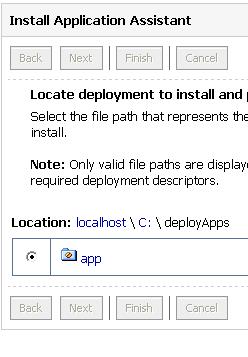
Select Install this deployment as Application and click Next


9) Activate Canges by clicking on button on left as shown in screen


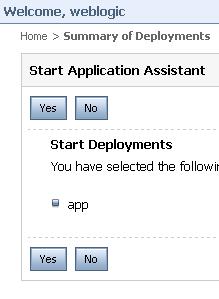
10) Start Application by clicking on Start Button


Thursday, November 8, 2012

DOMAIN_HOME Structure

Hi Guys...

After configuring your domain 
The Directory structure is like


The structure After Instalation of  weblogic server Bea_HOME will Create and later .... Inside the Bea_Home directory we have no of directories are created like WL_Home and JDK_Home...

After configuring your  Domain  the user_projets and inside the directory domains ....... these directories will create ...

Weblogic Domain Configuration in gui

Domain Creation

Just like installation , there are 3 modes of creating domain
  1) GUI mode
  2) console mode ( text mode)
  3) Template based domain creation
Two important files related to domain creation…
$WL_HOME/common/bin/config.sh
 Weblogic Installation comes with a default skeleton file of the domain.
 $WL_HOME/common/templates/wls.jar ( check this again)
Config.sh internally uses this wls.jar file create the domain of our choice of architecture.
We can create our own skeletons that we will see in WLST scripting sessions that will come later
WEBLOGIC Domain Creation

 1. Go to    “ /BEA/wlserver_10.3/common/bin/”
          AND in bin directory contains   config.sh file .
          so we are creating Domain by using  config.sh file
          THE Syntax is      “$./config.sh”

2. Select“Create a new WebLogic domain”aPP


3. Select “Base this domain on an existing template”
This is the default template that comes with weblogic installation


4. Give the UserName ,PassWord and Confirm Password  AND Click on Next Button


5. Click on Next Button


6. Chose Yes Radio Button


7. Chose YES AND Click on Next Button


8.Click on Next Button


9.Give the AdminServer Name,listenAddress and Listen Port AND click on Next Button


10.Then After we configured Managed Servers as follow below


11. Give the the managed Server names ,listen address and listen port values as follow like below mentioned 
·        Click on Next

12. click on Next Button


13. Click on Next Button

14. Click on next Button


15. we create weblogic domain like give the domain name and domain location as like below And click on Create Button


16. Click on Done Button


·        So we are completed Gui Mode Installation AND Domain Creation